
TikTok Introduces 'Delete and Re-Edit' Feature for Uploaded Videos
TikTok is testing a new feature that could make video editing on the platform more flexible and user-friendly. The platform is experimenting with a "Delete and Re-Edit" option, which allows users to completely reset their in-app video edits

and start fresh without having to re-upload or delete the clip.
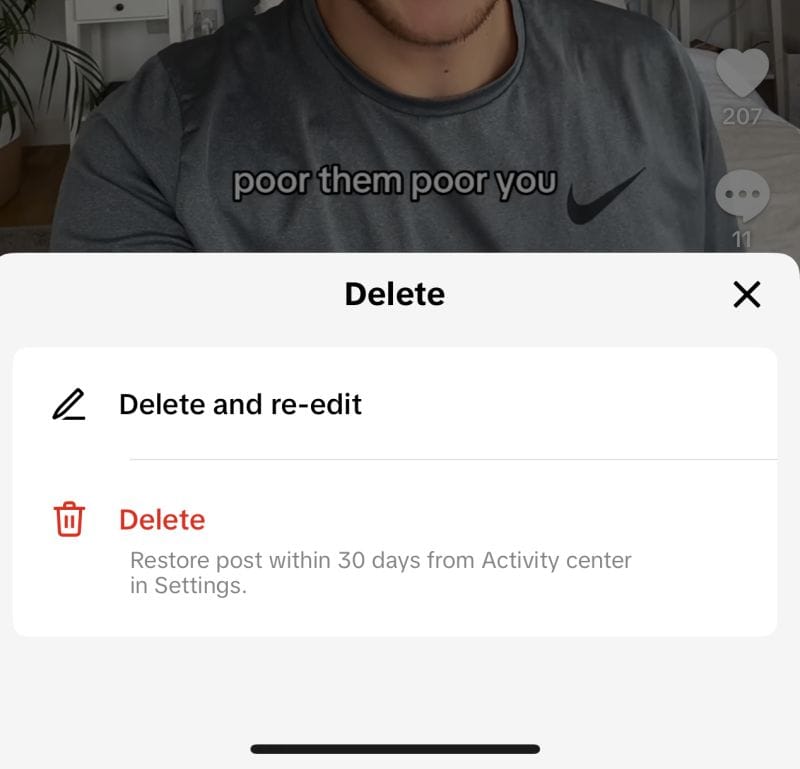
As highlighted by Owen Willis and shared by Matt Navarra, the feature gives users the ability to undo any edits they've made directly within TikTok. This could be particularly useful for those who frequently edit their videos on the app but later realize they want to try a different approach or improve their content. Instead of starting from scratch by uploading a new video, users can simply remove all previous edits and begin again with the same uploaded file.
It’s important to note that this feature only applies to videos edited using TikTok’s native editing tools. If you've used a third-party app like CapCut to make adjustments to your clips before uploading, the "Delete and Re-Edit" option won’t affect those changes. However, for creators who prefer to edit exclusively within TikTok, this feature could simplify the process of reworking their content.
For those who keep the original footage saved on their device, the option to delete and re-upload has always been available. But many users complete both their filming and editing directly in TikTok, making this new update an efficient solution for on-the-go content creation.
While there’s no official word from TikTok about when this feature will be widely available, it’s definitely a welcome addition for creators who rely on the app for seamless editing and posting. We’ll keep you updated as more information becomes available regarding the rollout.
This feature is yet another example of TikTok's focus on improving user experience and enhancing the creative capabilities within the app.